
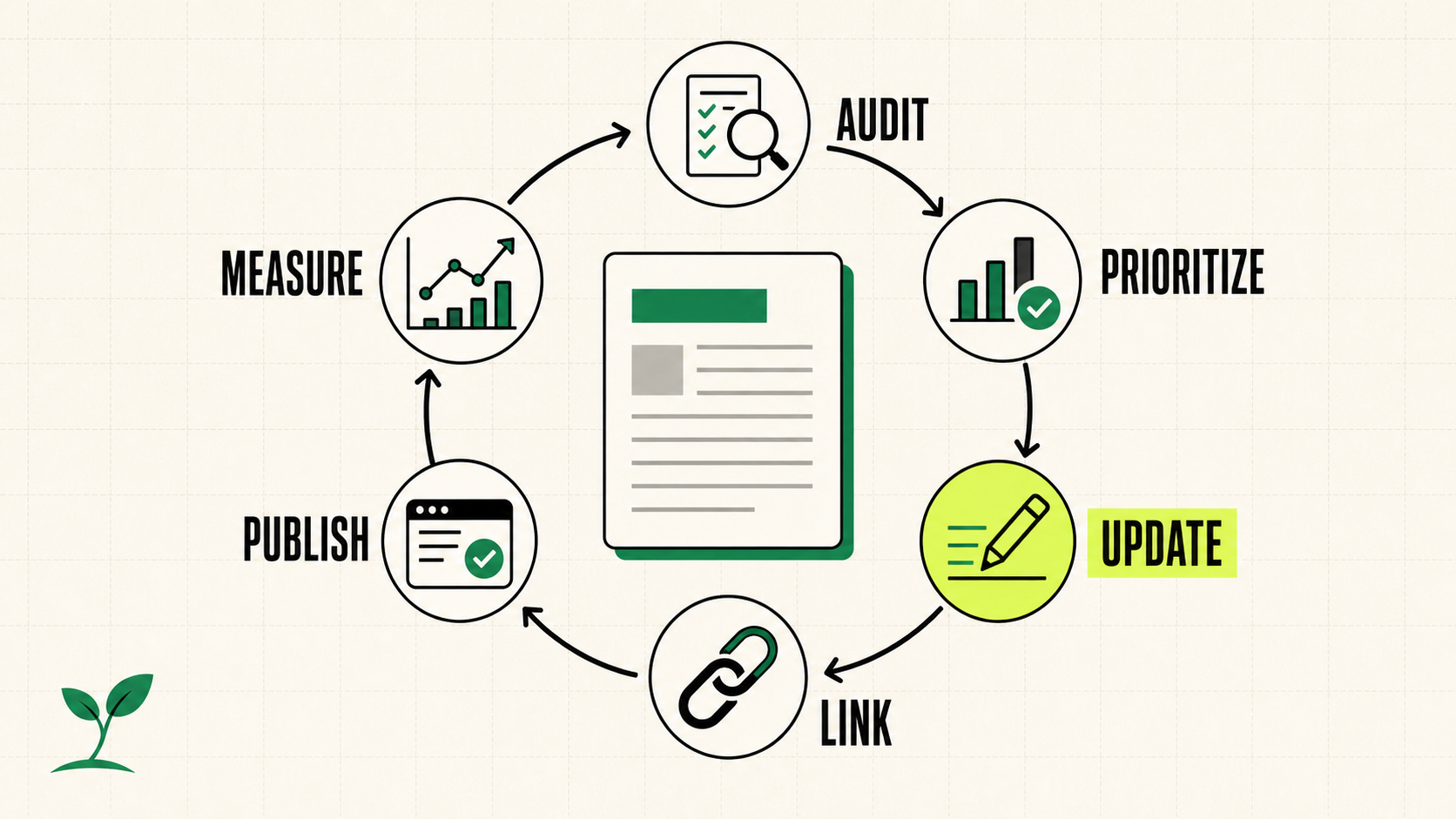
Refreshing old content is most useful when it follows a repeatable workflow instead of isolated edits. This guide shows how to choose a promising page, recheck search intent, update facts and examples, improve internal links, handle dates honestly, and measure the result in Google Search Console.
Audit and Prioritize Which Pages to Refresh First
Content inventory fields for refresh audits include URL, page title (H1), meta title, meta description, content format, word count, and last modified date collected into a spreadsheet before auditing content. Begin by exporting data from Google Search Console to surface pages with little or no traffic or declining performance, then compare those results against Google Analytics sessions to confirm the drop. High-impression, low click-through rate pages stand out as prime candidates because the impressions already exist but engagement lags.
Export GSC performance reports filtered by high impressions and low CTR.
Cross-reference the same URLs in Google Analytics to isolate pages showing declining organic sessions.
Add columns for current word count and last modified date.
Prioritize pages with existing SEO value or strategic alignment.
Identifying pages to refresh via analytics means focusing on rankings just outside page one or content that mixes outdated statistics with strategic keywords. Skip random guesses. The spreadsheet helps organize the refresh process and prevents teams from wasting hours on pages that already rank in the top three without clear decay signals. Once the list is ranked, move the highest-priority pages into the next phase.
Revalidate Search Intent Before Changing Titles or Focus
Review the current SERP for the target keyword before touching a single heading or meta tag. Search the primary term in an incognito window and note whether the top results have shifted toward how-to guides, comparison pages, or product roundups since the original article published. If video embeds now dominate the first screen, the intent may have moved from text-only explanations to visual demonstrations.
Rewrite intros that rely on year-stamped context or outdated trends so the opening paragraph speaks to today’s reader without promising data from 2021. Adjust titles only when intent has genuinely changed; swapping a title that still matches the dominant result type risks losing the modest position the page already holds. For example, a post with a year-stamped title may need a refresh if search intent has shifted, but a title that remains accurate should stay untouched.
This step protects against misaligned updates that confuse both users and search engines. When intent stays consistent, keep the original title and focus effort on deeper content improvements instead.
Update Facts, Examples, and Outbound Links Responsibly
On-page elements to review during refresh include keywords, headings, meta descriptions, image alt text, and structured data, alongside updating outdated statistics and broken external links pointing to credible sources. Basic refresh actions list the following steps in order.
Replace outdated statistics with current figures traced to primary sources such as government agencies or original research reports rather than secondary summaries.
Audit every outbound link and swap broken URLs with working alternatives from the same domain or a comparable authority.
Expand topical depth by adding updated data, clearer explanations, and layered intent coverage.
Avoid substituting broken external links with links to your own content unless the replacement genuinely answers the reader’s next question.
Replacing stale facts with current primary evidence makes the article more accurate and easier for readers to verify. Check every outbound link, retain useful citations, and replace broken references with the closest authoritative source.
Related reading: https://blog.siteseed.ai/how-to-scale-blog-content-without-hiring-writers
Strengthen Internal Linking Strategy During the Refresh
After refreshing a page, review the internal links pointing to it and confirm that their anchor text still describes the revised focus. Update anchors that feel forced or misleading. Then scan the refreshed article for relevant newer resources published since the original date, adding links only when they help readers continue the topic.
Canonical and URL stability matters here. Do not change the URL simply to signal freshness. If a content management system generates a new slug during republishing, restore the original address and set the canonical tag to the preserved URL. This approach avoids breaking external backlinks and keeps historical ranking signals intact. The result is a tighter site architecture that supports the refreshed page without creating cannibalization among similar topics.
Apply Republishing Dates Only When Changes Are Significant
Change the publication date only when the article receives new data, expanded sections, or structural revisions that represent significant updates.
Handle minor updates without altering the publication date so Google still sees an update without an artificial freshness boost.
After a substantial update, you may request recrawling through Google Search Console. Google notes that requesting a crawl does not guarantee immediate inclusion in search results.
Use visible publication and modified dates only when they accurately describe the page. Google recommends clear dates and warns against making a page appear fresh when it has not changed substantially. Treat a recrawl request as a notification, not a promise of faster rankings.
Track Results and Set Sustainable Refresh Cadences
Choose a review window before publishing, then compare average position, impressions, clicks, and CTR in Google Search Console. Two to six weeks is a practical starting range for many teams, not a Google guarantee. The cadence below is an operating recommendation that you can adjust to traffic, seasonality, and business importance.
Content type
Review frequency
Primary KPI focus
Top traffic drivers
Monthly
Average position and clicks
Evergreen guides and long-form
Quarterly
Impressions and CTR
Low-traffic, high-potential pages
Annually
Traffic trend and backlink growth
Pruning options for outdated content include update, consolidate into a stronger page, or delete with a redirect to the nearest relevant live URL. Document each decision and the performance delta 60 days later. The feedback loop reveals which refresh types actually move rankings so the workflow improves over time.
SiteSeed can support this workflow by keeping article briefs, source research, review status, publishing, and future refresh tasks in one operating system. For example, an agency can create a refresh brief that records the page’s baseline metrics, search intent, approved factual updates, internal-link targets, reviewer, publication date, and next review date. That shared record makes it easier to compare results later and reuse the process across client sites. The editorial decisions still belong to your team: confirm intent, verify every material claim, approve meaningful changes, and document what was updated and why. SiteSeed organizes the operation; it does not replace accountable editorial judgment.
Implement this workflow on one high-potential page this week, then expand to a quarterly cadence. Before editing, record the page’s current clicks, impressions, CTR, average position, title, publication date, and target intent. After publishing, log exactly what changed and set a review date. Compare the same metrics at the end of your chosen observation window. Keep, revise, or retire the process based on evidence from your own site rather than a universal refresh schedule.
Sources and further reading
Google Search Console — Performance report: https://support.google.com/webmasters/answer/7576553
Google Search Central — Crawlable links: https://developers.google.com/search/docs/crawling-indexing/links-crawlable
Google Search Central — Ask Google to recrawl URLs: https://developers.google.com/search/docs/crawling-indexing/ask-google-to-recrawl